
Ops & Data
Define the checks for operating data, hand-offs, and exceptions.
CaseCraft Systems / ORBI
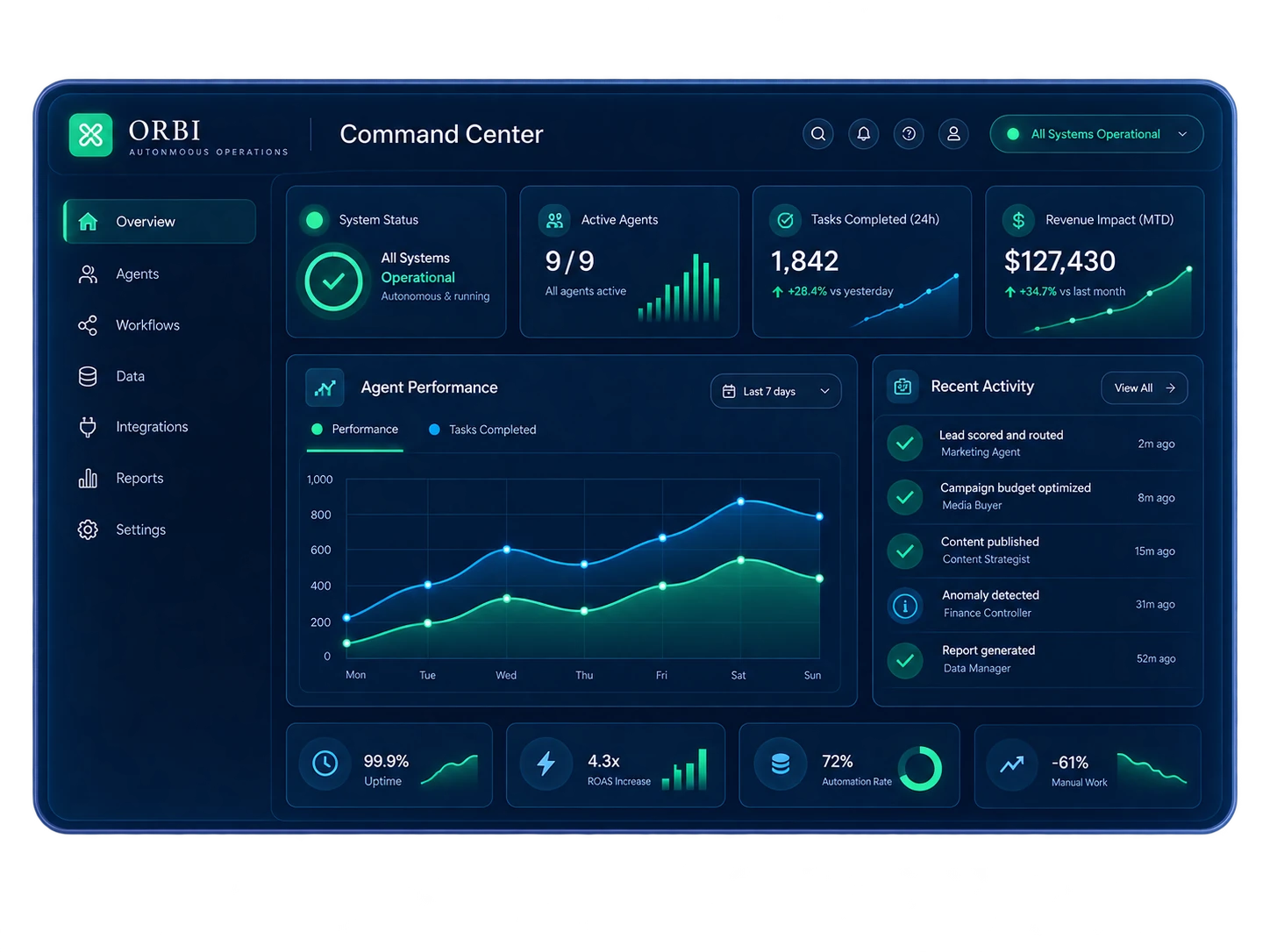
ORBI is the operations side of CaseCraft Systems. It shows what is happening, flags what needs a decision, runs the actions you approve and reviews the result.
Screens on this page use sample data, not a live account. We confirm connections, agent roles and permissions for each setup.
One operational feedback loop
WAVS is organized around the customer journey. ORBI is organized around the operational response: what is happening, what needs a decision, what action is appropriate, and what the result teaches the team.
01 / Observe
Status, activity, agents and performance share one view. Setup starts with two choices: which sources to connect, and which signals deserve your attention.
02 / Decide
ORBI flags items that need a decision. For each one we define what triggers it, who owns it and what evidence they see before acting, then test those rules in your setup.
Questions to define with your team
What changed?
Who should decide?
What action is allowed?
Example decision framework · not a live ORBI alert feed
03 / Act
ORBI groups work into six agent areas. Before any agent runs, we set its data access, what it may do and where a person has to approve.
Define the checks for operating data, hand-offs, and exceptions.
Map how a new inquiry should be reviewed and routed.
Set the next response and the approval needed to send it.
Choose which campaign and market signals deserve review.
Plan the follow-through after service and the feedback to collect.
Scope a role around a verified task, access, and decision boundary.
Activity, not just a dashboard
The activity feed records what happened and what was proposed. These four events show the kind of questions your team answers in it.
What context is needed, and who owns the next step?
Which route is approved, and when should a person step in?
Who should review a rescheduling or capacity decision?
What evidence should be checked before adjusting the plan?
04 / Improve
Trace each result back through the action and the customer activity that started it. The measures you get depend on the sources you connect.
A good review asks how ad spend, leads, bookings, revenue and return on ad spend relate, then picks one operational change to make next.
Connection surfaces
These are the source types ORBI is designed around. For your account, we check each connection, its permissions and its data quality before we build on it.
See the wider ecosystemDifferent jobs, one strategy
We map the hand-off between them, the integration route, permissions and the points where a person decides, all around the tools you already use.
Explore WAVS Explore the ecosystemProduct knowledge center
Straight answers about agents, approvals, connections, data access, setup, and how ORBI differs from WAVS.
ORBI is the operations side of CaseCraft Systems. It works in four steps: observe what is happening, flag what needs a decision, act through approved responses, and review the result so the next cycle improves.
No. A CRM organizes customer records and deals. ORBI focuses on operations, decisions and responses. The two do different jobs and can work side by side.
Teams whose operational signals are spread across several tools, so problems surface late and hand-offs slip. We check the fit, the data sources and the actions you want before recommending it.
ORBI can show status, activity, performance and team context. We confirm one by one which of your sources can connect.
ORBI shows the issue with its context, routes it to an owner or an approved workflow, and records what happened next. We confirm each detection and action for your setup before relying on it.
An agent is a named area of responsibility, such as intake or follow-up, with its own data access and allowed actions. We scope each agent for your business before it touches live work.
A workflow follows fixed steps and conditions. An agent reads context and suggests or coordinates a next step. For either one, we set the boundaries and human controls before it goes live.
Yes. We define the job, its inputs, its limits and its approval points, and we test that it is feasible before calling it ready to deploy.
It flags an item that needs a person to look at it, instead of burying it in a dashboard. For your setup we define who owns each decision, what evidence they see and what happens next.
Only where you allow it. We sort each step into information only, automated, or needs human approval, and we confirm the configuration enforces those rules.
That is the plan for anything sensitive. Recommending and executing are separate states, and we set up that separation with the product team and your administrators before launch.
A running record of operational events and of the steps that were proposed or completed. What it logs depends on the sources you connect.
We document your CRM, the data ORBI needs, the access rights and the direction of the hand-off. Then we check whether a native, API or custom connection exists before promising one.
Yes, that is where it helps most. Each source still needs a working connection and approved access, and we confirm those one at a time.
ORBI can bring activity and commercial numbers into one view. We agree with you on the metrics, where the data comes from and how often you review it.
Only the sources you authorize. We confirm the product controls, permissions and data retention with you before any deployment commitment.
We plan for it up front: how the team finds out, which actions pause and who fixes it. We test the product alerts for your setup before launch.
Yes. Start with one operational question, one data source, one owner, one approval rule and one result to review. Expand once that first route works.
We start by mapping context, hand-offs and controls with your team, then configure what the product supports for the systems you already use. Timing depends on that map.
WAVS is the customer workspace. ORBI handles operational signals and responses. They do different jobs, and neither replaces the other.
Yes. A customer signal in WAVS can feed an operational decision in ORBI. We confirm the connection, consent, access and actions for your setup before building it.
Design the right level of action
Show us where work stalls or decisions get buried. We’ll map the relevant signals and the human approvals your process needs.
Start a conversation